When using Equipple as a Teacher, it is important to ensure you are associated with your class or students. If you do not see your class or students, the solution is simple, please follow the steps below.
Confirming The Problem
There are two possible reasons why you, as a teacher, may not see your class(es) or pupils. To check which one applies to you, perform the following quick test.
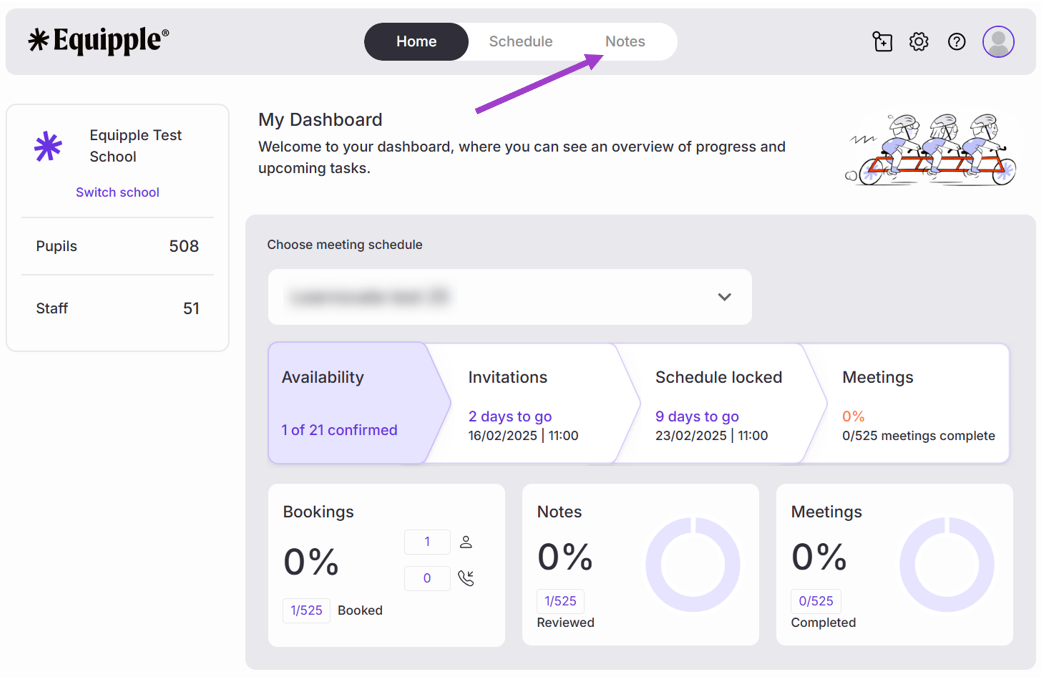
- From your Equipple Home screen, navigate to the ‘Notes’ tab.
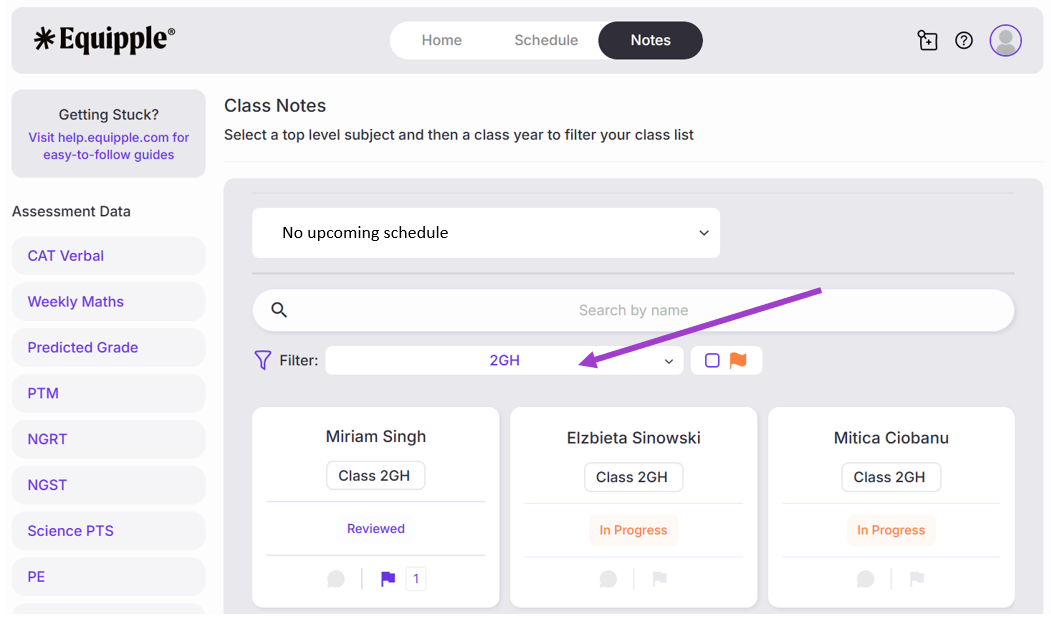
- If you can select your class from the drop-down filter option (2GH in this example) and your list of pupils appear (Miriam, Elzbieta and Mitica in this example), then the only issue likely is that your class has not been included in the school's meeting schedule.
- Classes and pupils should appear in ‘Notes’ regardless of whether they have been included in a meeting schedule.
Solution – Speak to your school’s Admin for Equipple
Your school's Admin for Equipple would have created the school's schedule initially. They will be able to add you to an upcoming schedule or provide a reason as to why you have not been.
If you still don't see your class(es) or pupils, then the issue is likely related to your schools' MIS platform. Please see below:
Solution: Updating the data at source
All data for classes, subjects, pupils and teachers is being synced from your school's MIS platform (e.g. SIMS, Bromcom etc.). This means that if some of this information is missing or incorrect, it is likely to be incorrect in the source system (e.g. SIMS, Bromcom etc.)
Fixing the issues in the MIS platform (the source) will result in the updates being pulled through automatically to Equipple.
The following solution will require you to have appropriate permissions for your MIS platform. If you do not believe you have these, speak to your school's MIS administrator.
- Login to your MIS platform.
- Find the class which should be associated with the Class Teacher in question.
- Check to see if the Class Teacher is associated with that class.
- If the answer is no, add the Class Teacher’s name and details so they are associated with that class. This will then pull through automatically to Equipple.
Note: Equipple looks for updates in your MIS platform every night. So please allow up to 24 hours before changes are reflected in Equipple.
- If the answer is yes, you will need to contact your MIS provider. They should be able to provide support to help you identify the root cause and ensure the data is up to date and accurate.
Still facing issues? If you have followed the above steps and are still not seeing the correct data in Equipple, please submit a support ticket, providing as much detail as possible to help our team troubleshoot.
Was this article helpful?
That’s Great!
Thank you for your feedback
Sorry! We couldn't be helpful
Thank you for your feedback
Feedback sent
We appreciate your effort and will try to fix the article